
Order Approval Workflow: Fast, Controlled Sign-Off for Field Orders
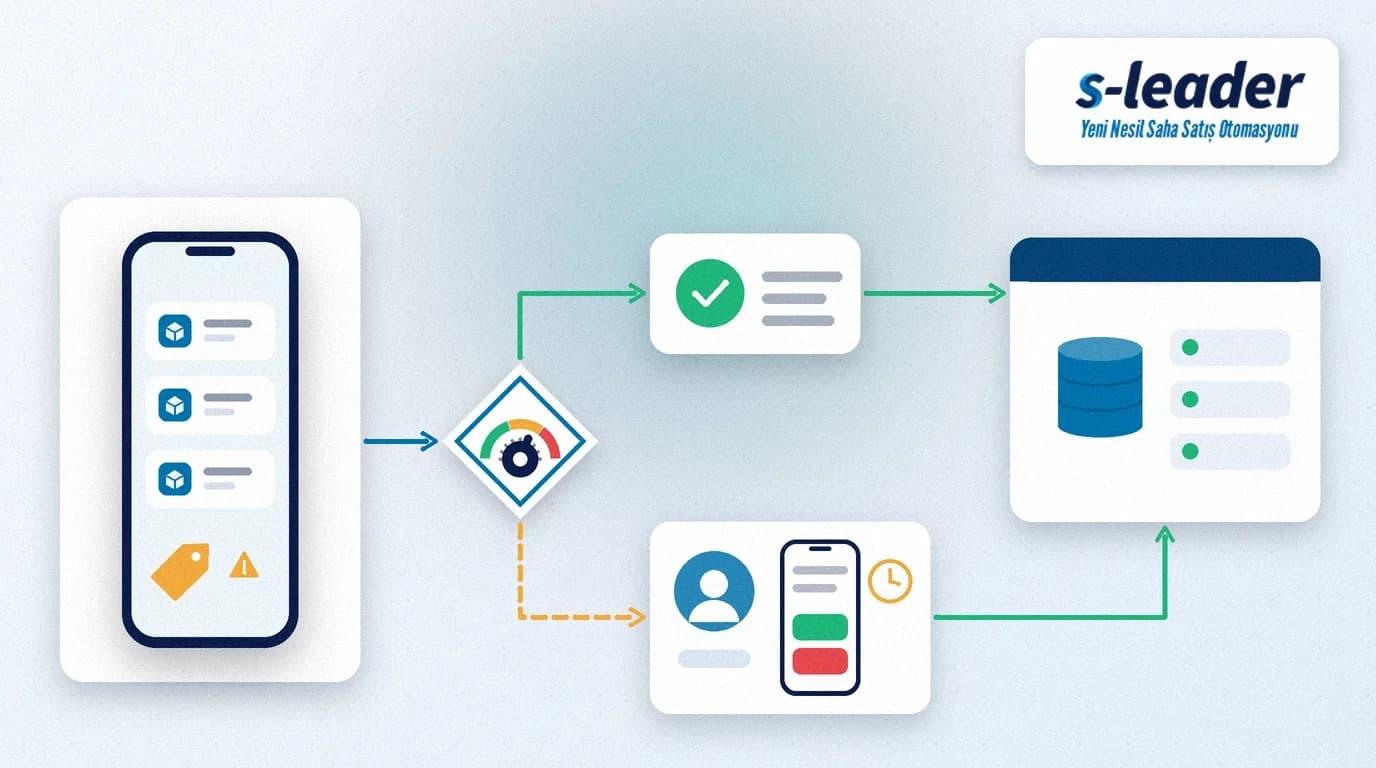
In short: An order approval workflow is the set of rules that decides when a field order is approved automatically and when it goes to whom, and in which order, for sign-off. In a well-designed order approval workflow, compliant orders reach the ERP without waiting, and only orders with a discount, credit-limit or price exception land on an authorised approver's phone.
When approvals run over phone calls, chat messages or an evening session at the office, two problems appear at once. The rep waits at the customer's counter for an answer, and while they wait the order shrinks or the customer postpones. Meanwhile, quick verbal approvals are never recorded, so at month end nobody can say which discount was granted on whose authority.
Summary
- Orders that follow the rules are approved automatically; nobody waits.
- Situations that need approval (discount, credit limit, price, quantity) are tied to written thresholds.
- Each threshold has a named approver and, if needed, a defined approval sequence.
- Response times and deputies are set, so no approval gets stuck with one person.
- Every decision is stored on the order with a reason and can be reported.
What is an order approval workflow?
An order approval workflow is a business rule that checks whether an order carries an exception and, if so, routes the decision to the right person. Promotion and discount rules decide which price applies to an order; we covered that in promotion and discount management in field sales. The approval workflow decides who makes the call when an order falls outside those rules, how quickly they must respond and how the decision is recorded.
The aim is not to send every order for approval. On the contrary, a good workflow reduces the number of orders that need one: the clearer the rules, the fewer the exceptions.
Which orders should require approval?
Discounts beyond the rep's authority
A discount above the rep's limit is the most common reason for approval. Define the limit per person, customer group or product group, and let anything below it pass automatically.
Credit limit and overdue balances
If the order pushes the customer's open balance over their limit, or the customer has overdue debt, the order should go to finance. ÇAP Teknoloji explains how this check works in the field in credit limit control in field sales.
Off-list prices or products
A price that is not on the price list, or a product the customer does not normally have access to, is a deliberate commercial decision. It should not be taken in the field alone.
Unusual quantities
Quantities far above the customer's normal order carry both stock and collection risk. Base the threshold on the customer's order history.
How to set up an order approval workflow
1. Write the thresholds down
Put the discount rates, balance situations and quantities that require approval into a single table. A vague threshold turns every order into a "let me just check" phone call.
2. Define approval levels and sequence
Some exceptions need one person's sign-off; others go to several people in turn. Microsoft's Power Automate approvals documentation distinguishes between approval types such as "first to respond", "everyone must approve" and "sequential approval". The same distinction works for field orders: a small discount may only need the area manager, while a large discount combined with a credit-limit breach may need sales first and finance second.
3. Set response times and deputies
If the approver is on leave or in a meeting, the order should not sit still. Set a reasonable response time for each level and a deputy or senior approver who steps in when it is exceeded. Escalating to the next person, rather than approving automatically on timeout, keeps control intact.
4. Record the decision with a reason
Approvals and rejections should be attached to the order with the approver, the time and a short reason. That record feeds the month-end discount analysis and, later, customer profitability reviews.
5. Keep the rep informed in real time
The rep should see in the app whether an order is "awaiting approval", "approved" or "rejected", and be able to explain a rejection to the customer on the spot. Orders taken where there is no signal enter the workflow once the device reconnects; see our article on offline field sales for that scenario.
Common mistakes
- Sending every order for approval: approvers get tired and start approving without reading.
- Bending thresholds for individuals: if the same discount passes automatically for one rep and needs approval for another, the rule loses credibility.
- Relying on a single approver: a workflow without a deputy locks up during the first holiday.
- Accepting verbal approvals: an unrecorded approval leads to arguments about who decided what.
- Rejecting without a reason: the rep does not know what to change and the order is lost.
Checklist
- Are the discount, credit-limit, price and quantity thresholds written in one table?
- Does every threshold have an approver and, where needed, an approval sequence?
- Are response times and deputies defined for timeouts?
- Are approvals and rejections stored on the order with a reason?
- Can the rep see the order status in the app immediately?
- Are the share of orders needing approval and the average approval time reported regularly?
Order approval with S-Leader
In the S-Leader field sales app, the order is created on a mobile device at the customer's site and sent to head office. When your approval rules are aligned with the prices, discounts and account data in your ERP, compliant orders move on without delay and exceptions end in a recorded, traceable decision.
At ÇAP Teknoloji we design the order approval workflow for your field teams with S-Leader, from thresholds to reporting. Get in touch for a demo or discovery call.
Sıkça Sorulan Sorular
Does an order approval workflow slow down sales?
Not when it is set up properly. Compliant orders pass automatically and only orders with an exception go for approval. With response times and deputies in place, approval can often be completed while the rep is still with the customer.
Which discount rate should require approval?
There is no single rate that fits every business. Set the threshold based on the product group's margin, the customer group and the rep's authority, write it down and review it periodically.
What happens if the approver does not respond?
Each level should have a response time. When it is exceeded, the order should be escalated to a deputy or senior approver rather than approved automatically, and the rep should see the status in the app.
Is an order approval workflow the same as a credit limit check?
No. A credit limit check detects whether an order exceeds the customer's risk limit. The order approval workflow governs who decides on that and similar exceptions, in which order and how quickly.