
Promotion and Discount Management in Field Sales: How to Apply the Right Price at the Moment of Order
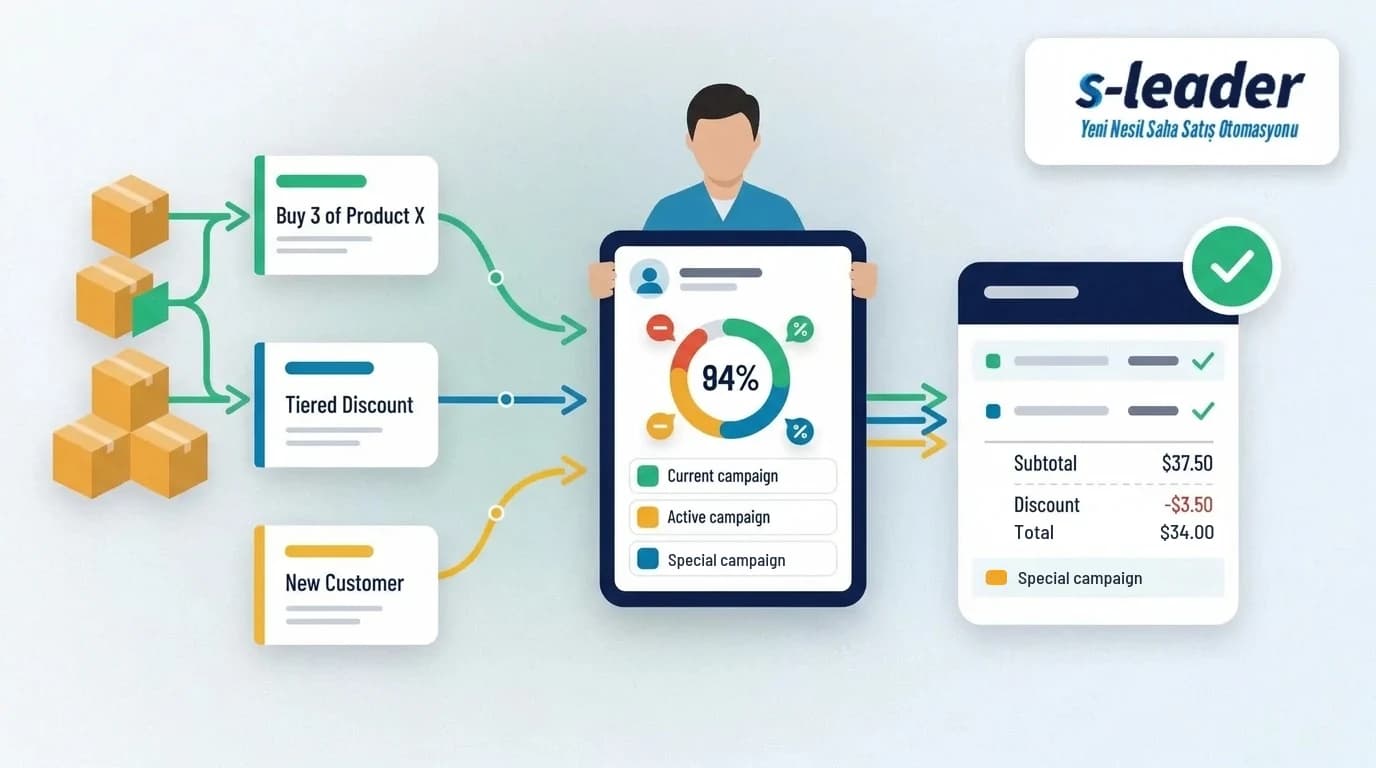
In short: Promotion and discount management in field sales means defining centrally which price, discount and promotion applies to which customer, and applying them automatically at the moment the order is taken. The goal is to stop reps from typing discounts by hand, protect margins and treat every customer by the same rules.
For distributors and wholesalers, price is never just a single list price. Customer-group price lists, seasonal promotions, volume discounts and the rep's room for negotiation all meet in the same order. When these rules live on paper or in the rep's memory, mistakes are inevitable. In this article we explain how promotions and discounts should be managed in the field, the most common mistakes and a checklist.
Key points
- Price, promotion and discount rules should be defined centrally and reach the field automatically.
- Price lists per customer or customer group give more accurate results than one list price for everyone.
- The rep's discount authority should be capped, and requests above the cap should go to approval.
- Promotions should appear on the order screen and apply automatically when their conditions are met.
- The price and discount in the order should be transferred unchanged to the ERP and the invoice.
- Whether a promotion worked should be measured with sales and profitability reports.
What Is Promotion and Discount Management in Field Sales?
Promotion and discount management means defining every rule that affects the selling price in one place and applying it the same way to every order in the field. These rules fall into three groups: customer-specific price lists, promotions tied to a period and conditions, and the extra discount a rep may give during the order.
For a field team, the real question is whether these rules are in the rep's hands at the moment of the order. If a promotion updated at head office does not reach the field, the rep keeps selling on old terms. And when the price is recalculated in the office, a gap opens up between the order and the invoice.
The Cost of Managing Discounts by Hand
- Margin loss: Discounts without a clear limit turn into deeper cuts than necessary, especially under month-end target pressure.
- Invoice corrections: A price gap between order and invoice means credit notes, price-difference invoices and back-and-forth with the customer.
- Inconsistent prices: When two similar customers buying the same product see different prices, trust suffers.
- Missed promotions: If the rep forgets a promotion, the customer does not get the discount they are entitled to, and the promotion's effect on sales cannot be measured.
- Duplicate work in the office: Orders are checked one by one in accounting to verify and fix prices.
Each of these costs looks small on its own. Accumulated over hundreds of orders, however, they clearly affect both profitability and the sales team's time.
Promotion and Price Types Used in the Field
Customer and group price lists
Separate price lists are defined for customer groups such as supermarkets, convenience stores, chains or dealers. Some large customers may also have negotiated prices. When the rep selects a customer, the price for that customer should appear automatically.
Volume and case-based discounts
The unit price drops for purchases above a certain quantity or number of cases. These promotions are often used to increase the average order value.
Free goods promotions
In promotions such as "buy 10, get 1 free", the discount is given as product instead of price. Adding the free item to the order and invoice as a separate line is important for accurate stock and profitability figures.
Basket value and product group promotions
An extra discount applies when the order total exceeds a certain level or when the customer buys from a specific product group. This method can also be used to speed up the listing of new products on the shelf.
Seasonal promotions
Promotions valid for a specific date range are defined for seasons, holidays or stock clearance periods. After the end date, the promotion should close automatically in the field.
Discount Limits and Approval Flow
Giving reps no discount authority at all weakens their negotiating power in the field; unlimited authority puts margins at risk. The balanced approach is to set a discount limit per rep or customer group.
- Discounts within the limit are applied directly by the rep.
- When a discount exceeds the limit, the order goes to approval and a manager approves or rejects it.
- Orders awaiting approval are visible on a single screen at head office, so shipping is not delayed.
- Reports show which reps exceed their limit and how often.
This structure keeps flexibility in the field while making it visible where and why discounts are given. A similar approval logic is used for credit limits and overdue balances; see our article on field sales collection tracking for details.
Applying Promotions at the Moment of Order and Transferring Them to the ERP
When promotion rules do not run on the order screen, the rep either forgets the promotion or calculates it by hand. In a well-designed setup, the valid promotion appears on screen as soon as the rep enters the product and quantity, and the discount or free goods are added to the order automatically once the condition is met.
Prices, discounts and free-goods lines in the order should be transferred to the accounting system unchanged. Recalculating the price during transfer creates a gap between order and invoice. That is why price lists and promotions need to stay in sync between the ERP and the field application. We cover this in detail in our articles on Logo ERP integration and Mikro ERP integration.
In hot selling, the invoice is issued during the same visit, so fixing the price at the moment of order is even more critical. In cold selling, the price in the order should not be affected by a promotion that changes on the delivery day.
Measuring the Impact of a Promotion
Judging a promotion by revenue growth alone can be misleading. These questions should be looked at together:
- How much did units sold and revenue grow during the promotion compared with the previous period?
- Did the total discount and free goods given pay for themselves through the profit on extra sales?
- What share of the targeted customers took part in the promotion?
- Did sales fall back to their old level after the promotion, and did new customers stay?
- How is the average discount rate distributed across reps and regions?
To track these indicators together with your other sales metrics, take a look at our article on field sales team KPIs.
Promotion and Discount Management Checklist
- Are price lists defined per customer and customer group?
- Do price and promotion updates reach the field automatically?
- Do promotions appear on the order screen and apply automatically when their conditions are met?
- Is there a discount limit per rep, and do orders above the limit go to approval?
- Are free goods added to the order and invoice as separate lines?
- Is the price in the order transferred unchanged to the ERP and the invoice?
- Do expired promotions close automatically in the field?
- Are promotion results reported in terms of revenue and profitability?
Promotion and Discount Management with S-Leader
In the Campaigns module of S-Leader, valid promotions are shown on the rep's screen in advance while taking the order and can be offered to the customer immediately. Customer-specific price lists and discount limits are managed from the same module. Orders taken in the field are transferred to the accounting system through the Logo and Mikro ERP integrations. Pending approvals are tracked in the BackOffice screen, and the report designer can be used to report promotion and discount results as needed.
If you would like to see how your own price and promotion structure would work in the field, you can request a free demo.
Sıkça Sorulan Sorular
What is discount management in field sales?
It is the practice of defining and limiting, through rules, the discount a rep may give during an order. It is usually run with customer-specific price lists, discount limits and manager approval when a limit is exceeded.
What is the difference between a promotion and a discount?
A promotion is a reduction applied to all customers or a customer group for a set period and under set conditions. A discount is usually an extra reduction the rep gives a specific customer during the order.
How is a free goods promotion reflected in the order?
In promotions such as "buy 10, get 1 free", the free item is added to the order as a separate line once the condition is met. This line must be reflected correctly in the invoice and in stock.
How is a rep's discount authority limited?
A maximum discount rate is defined per rep or customer group. Requests above this rate send the order to approval, and it is not processed until a manager approves it.
How do promotions reach reps in the field?
With field sales automation, the promotion is defined at head office and sent automatically to the rep's mobile device. The rep sees the valid promotions on screen while entering the order.
How is the success of a promotion measured?
Sales growth during the promotion, the total discount and free goods given, the number of participating customers and how sales develop after the promotion are assessed together. Looking only at revenue can hide the effect on profitability.